Putting a smart lock, video doorbell and indoor screen in one offer sounds like a simple promise: see who is at the door, speak to the visitor and let them in. In a real home, however, the devices may belong to different product lines, use separate apps and expose different controls. An indoor screen may show a camera feed without answering a doorbell call. It may receive a call but have no authority to operate the lock. A resident may need to move between several apps to complete what the sales demonstration made look like one action.
Before recommending a bundle, work backward from the customer’s intended visitor journey. Verify the exact devices, the required network and power, the installation conditions and the support boundaries. “Compatible” should mean a set of demonstrated actions under stated conditions, not a vague claim that devices are smart or connect to Wi-Fi.
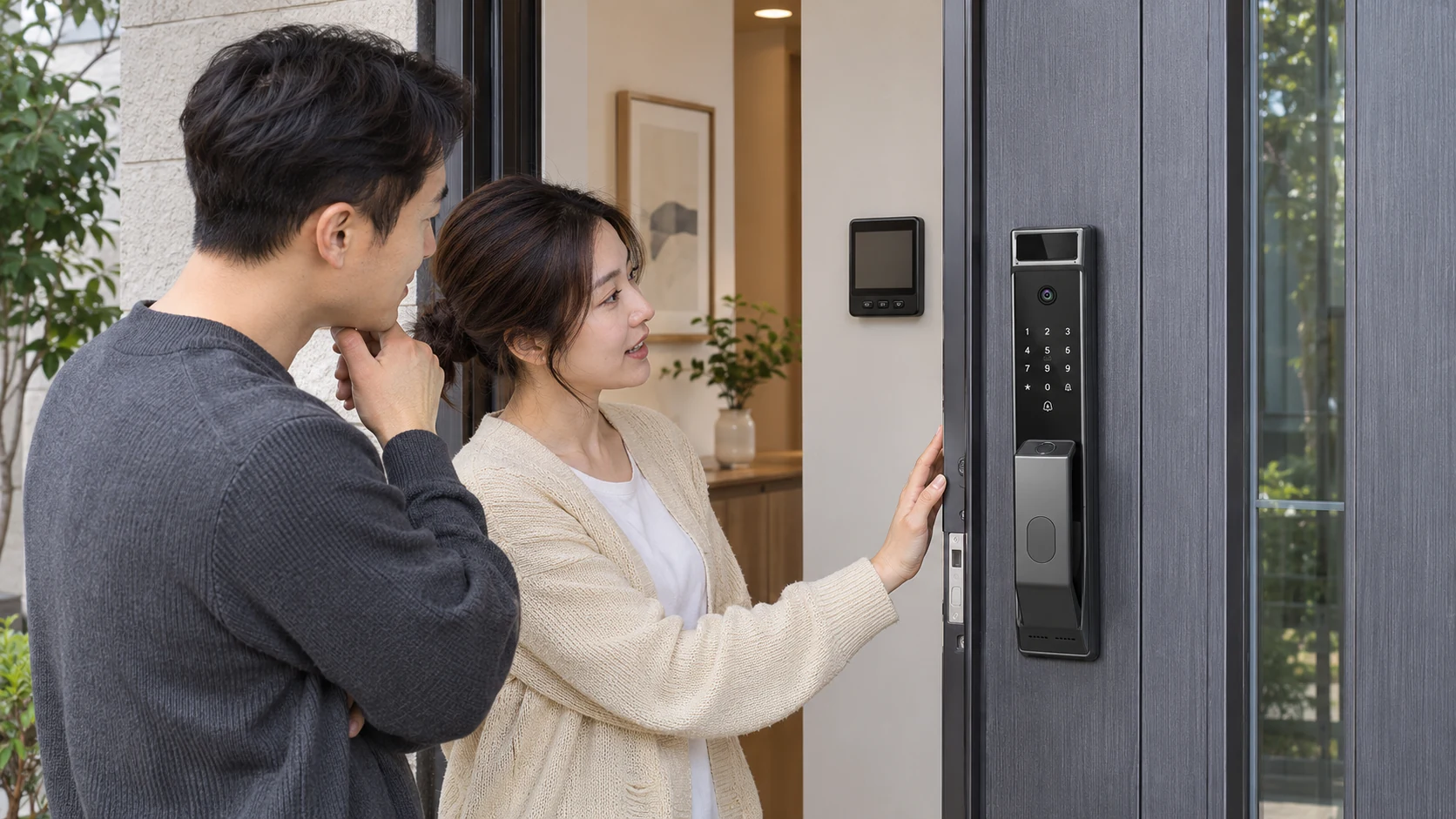
Some brands are already selling locks, doorbells and indoor viewing terminals together. On 17 November 2026, T3 reported the launch of SwitchBot’s Connected Home Security Combo in the UK and Europe. It described a camera, video doorbell, smart lock and ViewStation screen for viewing feeds, speaking to visitors and, with a SwitchBot lock installed, unlocking the door. This is one reported brand and configuration; it says nothing about compatibility across other brands, models or regions.
Start with the visitor journey
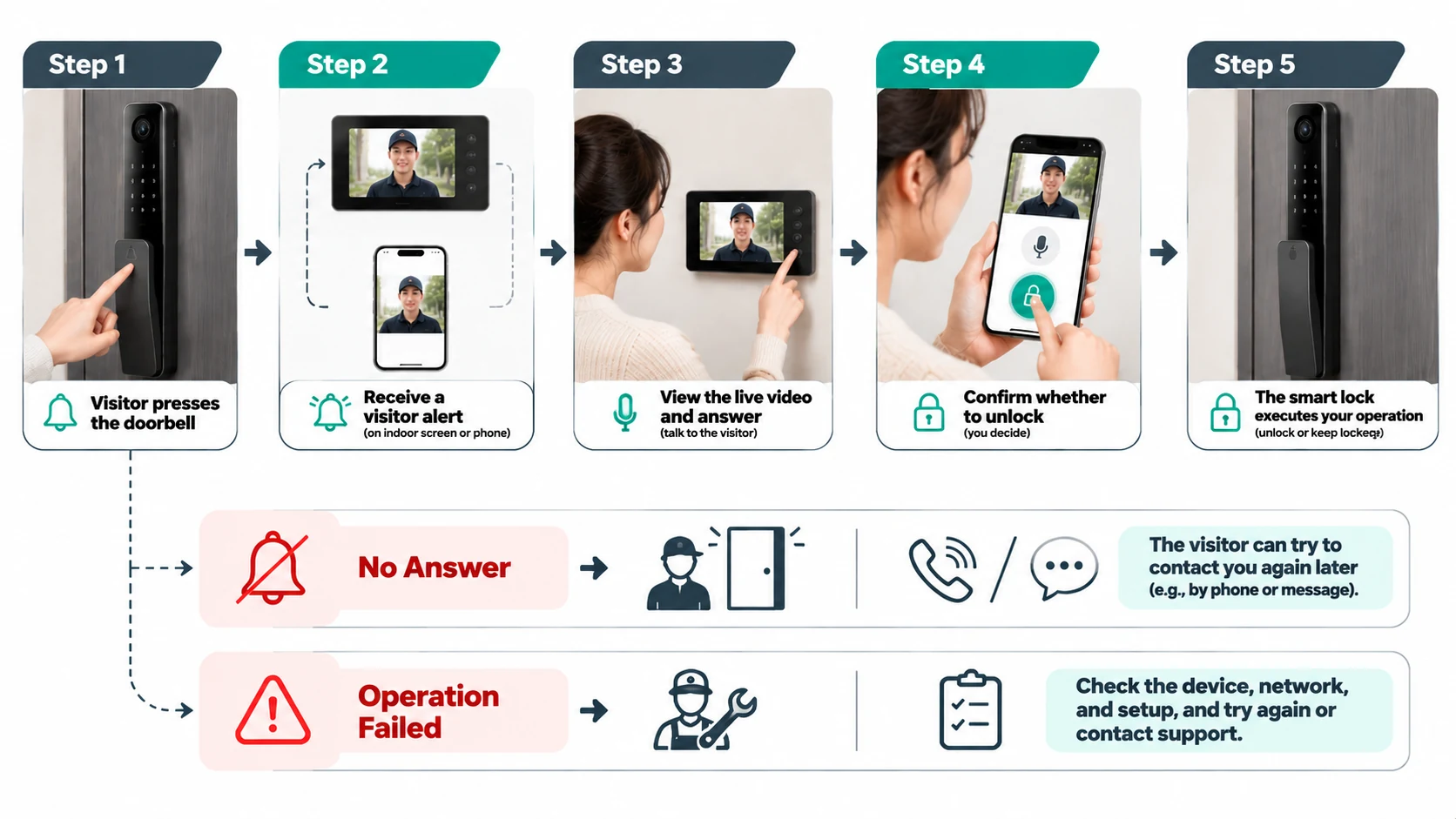
Ask the customer to describe an ordinary visit. Who should receive an alert, and should the household answer on a screen, phone or both? Must it work when residents are upstairs or away? After answering, do they want to talk, view the visitor and unlock? Which device starts an unlock, and is another confirmation or PIN required? Can more than one resident answer, and what access is available to a tenant, cleaner or guest?
Write down and demonstrate the steps: screen response, remote phone response, no answer, refusal, confirmed unlock and repeat call. Record the triggering device, user feedback, account or network conditions and failure path. This distinguishes coordinated packaging from a working end-to-end visitor process.
Four layers of compatibility
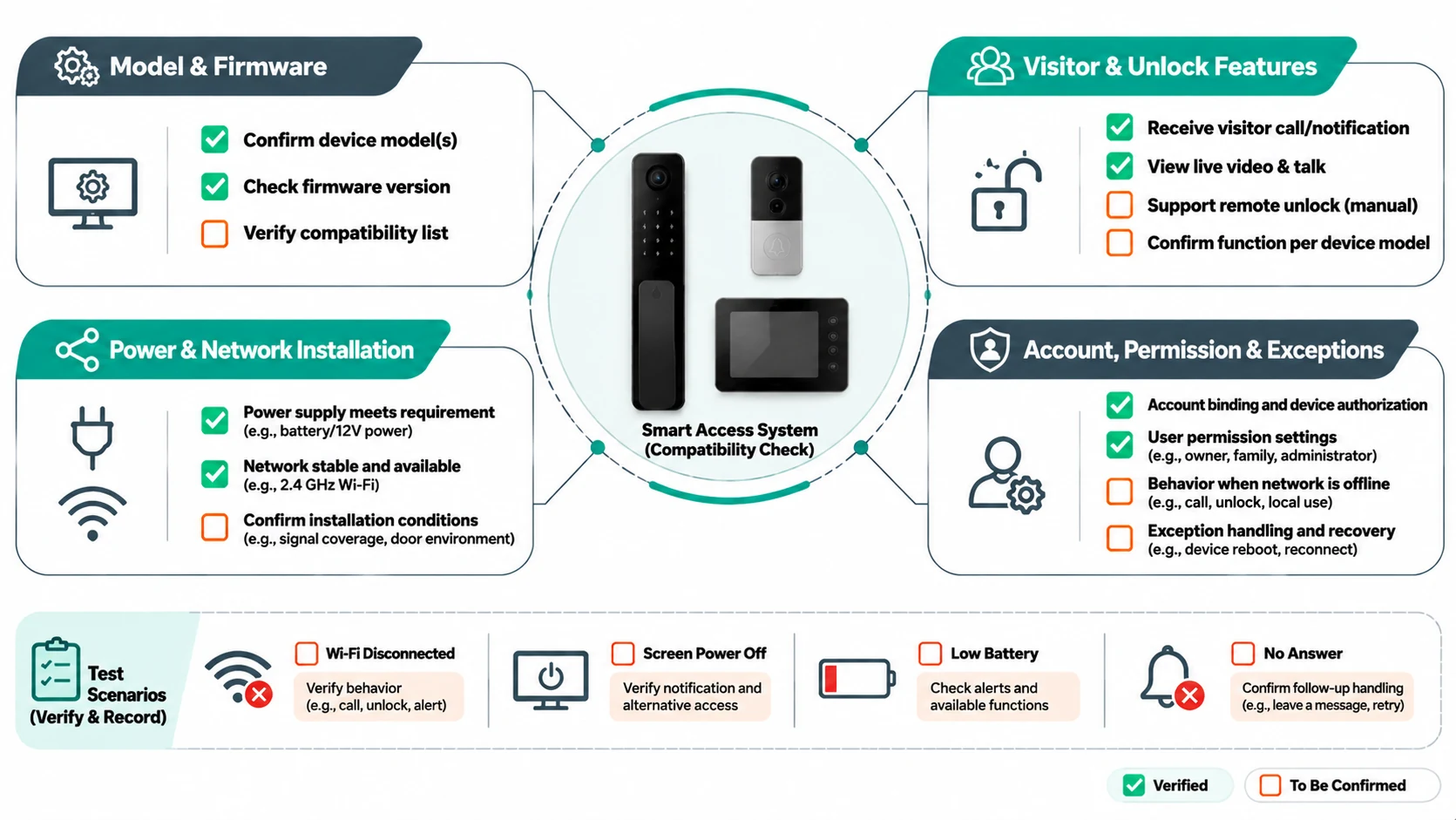
1. Device and model compatibility. Record the full model numbers, hardware revisions, firmware versions, sales region and included accessories for the lock, doorbell and screen. Check whether the manufacturer’s compatibility list names those exact models, not merely the brand or device category. Confirm whether the package needs a hub, repeater, chime receiver, power adapter or subscription. A supplier saying that all three devices use the same app does not prove that the screen can answer the doorbell or control the lock.
2. Feature compatibility. Ask separately whether the setup supports live video, two-way talk, a doorbell alert on the screen, unlocking from the screen, remote unlocking and event history. Opening another device’s app is not necessarily the same as receiving its call. Answering a call does not necessarily grant permission to unlock. Verify whether the unlock action requires another confirmation, a PIN, a permission or a subscription; whether it is logged; and how permissions work for different household accounts. A protocol badge, voice-assistant listing or successful wireless pairing is not proof that the complete workflow is supported.
3. Installation and network compatibility. The doorbell may use batteries or fixed power. The lock may depend on battery access, door construction or orientation. The indoor monitor needs a usable location and a reliable connection. Check the frame, door thickness, lock body, doorbell mounting surface, sight-line obstructions, cable route, outlet, Wi-Fi coverage and router location. Confirm the exact network requirements, such as a specified Wi-Fi band or wired connection, from the manufacturer’s documentation. “The house has Wi-Fi” is not a site assessment. If the screen needs a hub or permanent power, show the equipment and installation work in the quote.
4. Version and operating compatibility. Firmware, app interfaces, regional services and account permissions can change. Find out whether the devices must be linked to one account or one household, who creates the administrator account, how residents join, which functions remain available offline and how status or events appear after service returns. For a rental property, apartment building or small business, verify resident turnover, account handover, privacy notices and reset procedures. A bundle should not work only once on the salesperson’s demo phone while the buyer has no idea who owns the administrator role.
Make answering and unlocking distinct decisions
A doorbell alert is not authorization to enter. The interface and handover should let a user distinguish the visitor image, the call state and the unlock confirmation. The demonstration should show the actual labels and sequence: for example, whether the user must select unlock after answering, whether ending a call leaves a clear lock-status message and whether the screen can select between multiple entrances or cameras. For households with children, older adults or people with visual or hearing needs, test text size, alert volume, number of actions and feedback after an incorrect input on the actual devices. These are matters to verify, not qualities that can be inferred from a product photo.
Confirm who receives alerts, views recordings and unlocks remotely, and whether temporary visitor codes use a separate lock permission. If not every resident should unlock, test whether roles can be separated. Explain recording retention, storage, account sharing and data access from the actual settings and applicable requirements. Do not claim that devices share event records or privacy controls without checking.
Test ordinary operation and failure conditions
Before confirming an order, set up the exact models proposed for sale. Test in sequence: press the doorbell and check whether the indoor screen is alerted; answer on the screen and phone as intended; assess two-way audio; check whether the visitor is visible in daylight and the expected lighting; confirm that an authorized unlock operates the lock; check whether status or action feedback appears on the expected device; and let a second household member complete the permitted actions under their own account. Record firmware, account conditions, network setup and results. If a function depends on a particular brand, region or version, state that limitation in the quote and product information.
Then test likely failure conditions: Wi-Fi or internet loss, a screen without power, disabled phone alerts, low device batteries, a signed-out account, an unanswered call and an incomplete lock action. For each, verify remaining functions, warnings, fallback and whether recovery requires re-pairing. Behavior varies by product. Mark untested cases as unconfirmed rather than promising the bundle is outage-proof.
Confirm the manufacturer-specified emergency entry method and show how to use it. If the screen or doorbell fails, can residents still enter locally? Explain which functions depend on an account or network. Give the customer a handover card with the normal and backup entry paths, support contact and administrator owner.
Put installation and after-sales boundaries in the same quote
The three device categories may have different suppliers, installers and support teams. Name one customer-facing point of contact for a fault and explain that it receives and routes the report; do not imply that it can control every manufacturer’s cloud service or warranty decision. The installation scope should say who checks the door, installs doorbell wiring, positions and powers the screen, configures the network, creates the primary account, invites household members and demonstrates the full visitor journey. If the door, power or network is unsuitable, agree on whether work pauses, extra work is quoted or the bundle is cancelled.
Support can be routed by symptom: lock mechanics, doorbell image or notification, screen call, app account or home network. For each category, list what information to collect, the first checks and the party to contact. If a customer says, “The screen shows video but the unlock button does nothing,” first confirm the exact models, firmware, permissions, network and written compatibility guidance. Then decide whether the cause is installation, a limitation or a product fault. Do not ask the customer to repeatedly factory-reset devices at the door or change an administrator account without authorization. After replacing a component, test the full call-answer-unlock sequence again and follow the manufacturer’s process for removing old account bindings or permissions.
Hypothetical example: design around one household’s real routine
This example is fictional. It demonstrates a verification method and is not a real customer, a compatibility claim or evidence of WAFU product capability. Suppose a household has two adults and an older family member, no indoor monitor and no convenient outlet at the doorbell location. The family wants to check visitors from inside and answer on a phone while away, but does not want the door to unlock automatically when a call arrives.
The dealer first checks written support for the exact lock, doorbell and screen models. It verifies where the screen can be powered, how the doorbell can be mounted and whether wireless coverage reaches the entrance. In a test setup, the dealer checks the sequence “call, answer, confirm separately, unlock.” If the screen can show live video but cannot answer or initiate an unlock, the dealer revises the offer: the family may use the phone for those actions, or select a combination with documented support. It must not describe a viewing-only monitor as a full intercom terminal. After a pilot installation, both adults complete account setup, the older family member tries the controls and the installer checks the backup entry method with the internet disconnected. The handover records verified functions, network dependencies, power work, backup-key storage and the single support contact. The method can be reused; the capability and outcome cannot be assumed for another model or brand.
Questions the supplier should answer in writing
Ask the supplier to confirm model and firmware coverage, which doorbell events the screen can handle, unlock permissions, network and power requirements, offline behavior, retesting after an update or replacement, and the support owner for each fault type. Treat “smart-home compatible” or “supports automation” as unconfirmed until the supplier specifies what works.
The value of a lock, doorbell and indoor-screen bundle is the experience from the visitor’s first press to the resident’s entry decision. Verify models, functions, installation, network and permissions; walk through normal use and failures before promising a seamless system. This gives the channel a credible sales explanation and support path.
CTA: Evaluating a smart lock, video doorbell and indoor screen bundle? Contact the team to review the exact models, power, network, visitor flow and support responsibilities before deciding whether it is ready to sell as one package.
Source
- T3, Bethan Morgan, “SwitchBot just dropped a home security combo, featuring a camera, doorbell and lock – and it comes with an internal screen for quick views,” 17 Nov 2026. Cited only as a specific reported bundle example, not proof of compatibility for other devices: article.
Discuss your project
Share your project requirements, target market and questions with our team.